---
title: Catering Services
description: group catering
---
[Skip to content](https://support.webox.com/en/kb/catering-services#main-content)
English
Show submenu for translations

Open main navigation
Close main navigation
- English
Show submenu for translations
- Contact us
Contact us
How can we help you?
- There are no suggestions because the search field is empty.
1. [WeBox Knowledge Base](https://support.webox.com/en/kb)
2. [General](https://support.webox.com/en/kb/general)
# Catering Services
## Everything you need to order catering for meetings, team events, and company gatherings.
#### Place Your First Catering Order
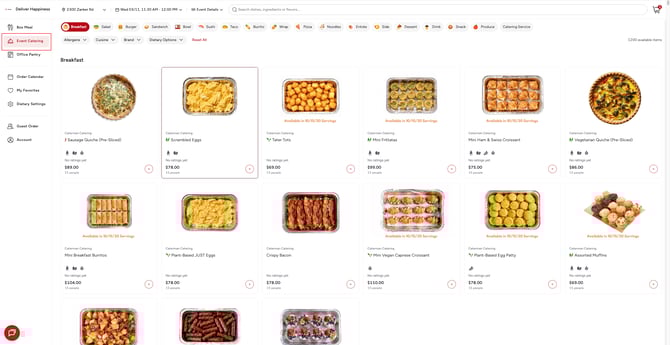
1. Click **Event Catering** in the left sidebar.
2. Set the **delivery date and time** — click the date at the top and pick a specific 30-minute window (e.g., 11:30 AM – 12:00 PM).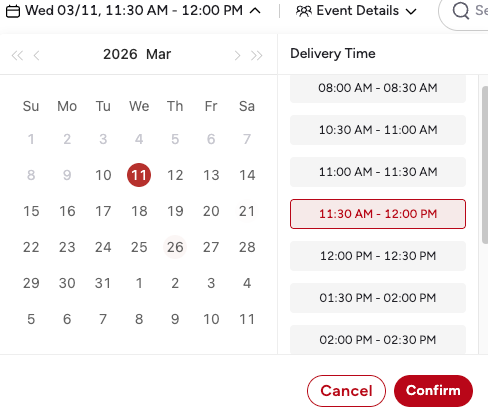
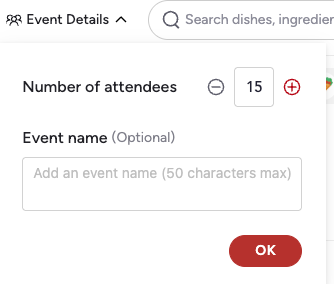
3. Set **Event Details** — click **Event Details** next to the date to enter the number of attendees and an optional event name.
4. Browse the catering menu, click a dish to choose your **portion size** (e.g., Serves 15 or Serves 20), then click **Add to Cart**.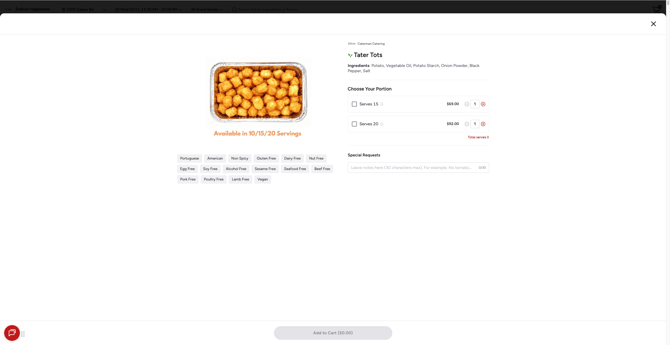
5. Open the **cart**, review your order, and click **Checkout**.
6. Fill in the delivery address, contact info, and payment method, then click **Place Order** — or **Generate Proposal** to share a quote first.
> **Tip:** Catering menus offer a much wider selection than Box Meal — including Breakfast platters, Produce, Desserts, and even Nursery & Flowers for event decoration.
---
#### How Catering Differs from Box Meal
If you’re familiar with ordering Box Meals, here’s what’s different in Event Catering:
| | Box Meal | Event Catering |
| --- | --- | --- |
| **Who it’s for** | Individual daily lunch | Groups and events |
| **Portion sizes** | Single serving | Serves 10 / 15 / 20+ people |
| **Pricing** | Per meal ($9–$17) | Per platter ($65–$130+) |
| **Time selection** | Lunch or Dinner | Specific 30-minute delivery window |
| **Filters** | Rating, Price, Brands, Eco Packaging | Allergens, Cuisine, Brand, Dietary Options |
| **Categories** | Cuisine-based (Japanese, Mexican…) | Includes Breakfast, Produce, Catering Service, Nursery & Flowers |
| **Extras** | — | Tableware, Onsite Server |
| **Checkout** | Simple payment | Event details, contact, delivery instructions, Generate Proposal option |
---
#### Set the Date & Delivery Time
Click the date in the top navigation bar to open the scheduling panel.
- **Left side** — A monthly calendar. Select the day you need catering delivered.
- **Right side** — Delivery time slots in **30-minute windows**, from 08:00 AM through 02:30 PM. Pick the slot that matches your event start time.
- Click **Confirm** to apply.
The selected date and time appear in the top bar (e.g., `Wed 03/11, 11:30 AM - 12:00 PM`) and can be changed at any time before checkout.
---
#### Set Event Details
Click **Event Details** next to the date in the top navigation bar.
- **Number of attendees** — Use the +/- buttons to set your headcount. This helps calculate per-person cost later.
- **Event name** (Optional) — Give your event a name for easy reference (50 characters max).
- Click **OK** to save.
---
#### Browse the Catering Menu
After setting the date and event details, you’ll see the full catering menu.
### Category Tabs
Scroll the top row to browse by category:
`Breakfast` · `Salad` · `Burger` · `Sandwich` · `Bowl` · `Sushi` · `Taco` · `Burrito` · `Wrap` · `Pizza` · `Noodles` · `Entrée` · `Side` · `Dessert` · `Drink` · `Snack` · `Produce` · `Dairy & Eggs` · `Nursery & Flowers` · `Catering Service`
### Filters
Use the filter bar to narrow results:
- **Allergens** — Exclude dishes containing specific allergens
- **Cuisine** — Filter by cuisine type
- **Brand** — Pick specific catering providers
- **Dietary Options** — Vegetarian, Vegan, Gluten-Free, etc.
- **Reset All** — Clear all filters
### Meal Cards
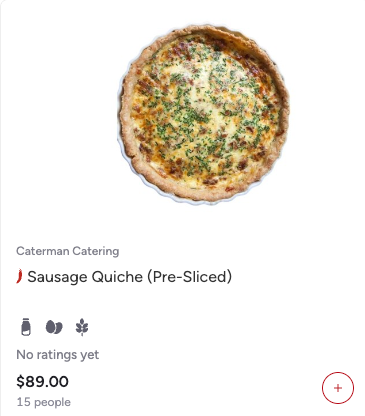
Each card shows:
- Dish photo and catering provider name (e.g., `Caterman Catering`)
- Dish name and dietary icons
- **Price per platter** (e.g., $78.00, $89.00)
- **Serving capacity** (e.g., `Available in 10/15/20 Servings`)
- Number of people served (e.g., `15 people`)
- An **Add** button (+) for quick add
---
#### View Dish Details & Choose Portion
Click any dish card to open the detail page.
### What You’ll See
- **Dish photo** — Large image of the platter
- **Provider name** — e.g., `Caterman Catering`
- **Ingredients** — Full ingredient list (e.g., Butter (Dairy), Cream (Dairy), Egg)
- **Choose Your Portion** — Select the serving size that fits your group:
- e.g., `Serves 15` — $78.00
- e.g., `Serves 20` — $104.00
- Adjust the quantity for each portion with +/- buttons
- **Total serves** updates as you add
- **Dietary tags** — Portuguese, French, Non Spicy, Gluten Free, Nut Free, Soy Free, Alcohol Free, Sesame Free, Seafood Free, Beef Free, Pork Free, Poultry Free, Lamb Free, Vegetarian
- **Allergens** — Icons for flagged allergens (e.g., Dairy, Egg)
- **Special Requests** — Free-text field for custom instructions (30 characters max, e.g., “No tomato”)
- **Add to Cart** button — Shows the running total (e.g., `Add to Cart ($78.00)`)
---
#### Review Your Cart
Click the **cart icon** in the top-right corner to open the cart panel.
### Cart Contents
- **Delivery time** at the top (with edit/delete icons)
- Each item shows: dish name, portion size (e.g., `Serves 15`), price, quantity controls
- **Total serves** — Running total of how many people all items cover
### Cost Breakdown
- **Subtotal** — Sum of all platter costs
- **Delivery Fee** — Typically $0.00
- **Service Fee** — Platform fee
- **Tax** — Applicable taxes
- **Total** — Final amount
A note at the bottom reads **“Add your guest count for cost per person”** — set your attendee count in Event Details to see the per-person cost.
When ready, click **Checkout**.
---
#### Checkout & Place Order
The checkout page has several sections. Fill them in from top to bottom.
### Catering Request Details
- **Customer Account** — Search for and link a customer account (useful for recurring clients)
- **Customer Name** (Optional) — The client or organizer name
- **Event Name** (Optional) — Name of the event
- **Number of Attendees** — Confirm headcount
### Order Detail
- **Delivery Time** — Confirms your selected date and time window
- **Items** — Lists all dishes with portion sizes, prices, and quantities. You can still adjust quantities or click **Add More** to add more items.
- **Tableware** — Toggle on if you need plates, utensils, and napkins (additional cost may apply)
- **Onsite Server** — Toggle on to request a server at your event (charged per server per hour)
### Contact
- **First Name / Last Name** — Contact person for the delivery
- **Phone Number / Email Address** — For delivery coordination
- **+ Add Other Contact** — Add additional contacts if needed
- **Delivery Time** — Confirm or change the time slot
### Delivery Address
- **Delivery Address** — Select from saved addresses or enter a new one
- **Address Line 2** — Suite, floor, or room number
- **Delivery Instructions** (Optional) — Parking details, entrance info, or special delivery notes
### Billing Information
- **Email Address** (Optional) — For invoice delivery
- **Billing Address** (Optional) — If different from delivery
### Payment
Choose your payment method:
- **Personal credit/debit card** (e.g., VISA \*1038)
- **Company allowance** — Use your company meal budget
- **Company card** — Shared company payment card
Click **Edit Card** to update card details.
### Payment Summary (Right Side)
The right panel shows a live cost breakdown:
- Items, Tableware & Server, Subtotal
- Delivery Fee, Service Fee, Tax
- Credit Card Processing Fee
- **Total** (e.g., $111.26)
- **Price / Person** (e.g., $7.42) — Calculated from total ÷ attendees
- **Cancellation Policy** link
### Submit
Two options at the bottom:
- **Place Order** (red button) — Submit the order immediately. Payment is charged.
- **Generate Proposal** (white button) — Create a proposal/quote to share with stakeholders before committing. No payment is charged until the proposal is approved.
---
#### Common Questions
**How far in advance should I order catering?**
We recommend ordering at least 1–2 days ahead to ensure your preferred dishes and time slots are available.
**What’s the minimum order for catering?**
There is no strict minimum, but catering platters are designed for groups — the smallest portion typically serves 10 people.
**Can I mix items from different catering providers?**
Yes. You can add dishes from multiple providers into the same cart.
**What’s the difference between Place Order and Generate Proposal?**
**Place Order** submits and charges immediately. **Generate Proposal** creates a shareable quote — useful when you need approval from a manager or client before ordering.
**Can I request tableware and a server?**
Yes. Toggle on **Tableware** and/or **Onsite Server** during checkout. Tableware may be free or incur a small charge. Onsite servers are billed per server per hour.
**How do I change the delivery time after ordering?**
Contact support as soon as possible. Changes depend on availability and how close to the delivery time you are.
**Is there a per-person cost shown?**
Yes. Set your attendee count in Event Details, and the **Price / Person** will appear in the Payment Summary on the checkout page.
**Can I cancel a catering order?**
Check the **Cancellation Policy** link on the checkout page for the cancellation window and refund terms.
---
WeBox Help Center | Last updated: 2026-03-11 | Need more help? Contact support — typical response time under 5 minutes.
- [Getting started](https://support.webox.com/en/kb/getting-started)
- [FAQs](https://support.webox.com/en/kb/faqs)
- [General](https://support.webox.com/en/kb/general)
- [Account](https://support.webox.com/en/kb/account)
- [Support](https://support.webox.com/en/kb/support)
[](http://www.webox.com)
[mailto:email@email.com](mailto:email@email.com)
Copyright © 2026, WeBox Inc